 KOBUSHI
Matchup Notes for Tekken 8
日本語
KOBUSHI
Matchup Notes for Tekken 8
日本語
One second on the VS screen,
your gameplan opens automatically.
KOBUSHI reads the Tekken 8 VS screen and instantly opens the matchup sheet for the character you are facing. Live streams, tournaments and meetups, and your post-match review — everything around Tekken 8, in one app.
Updates arrive after Store reviewVer.6.1.0 Latest versionWindows shows a warning during install
Get new features and fixes soonerVer.6.2.0 Use in browser
Windows app / Browser / Phone & tablet · 日本語 / English / 한국어
Note: auto Match Scan is not available in the browser version.
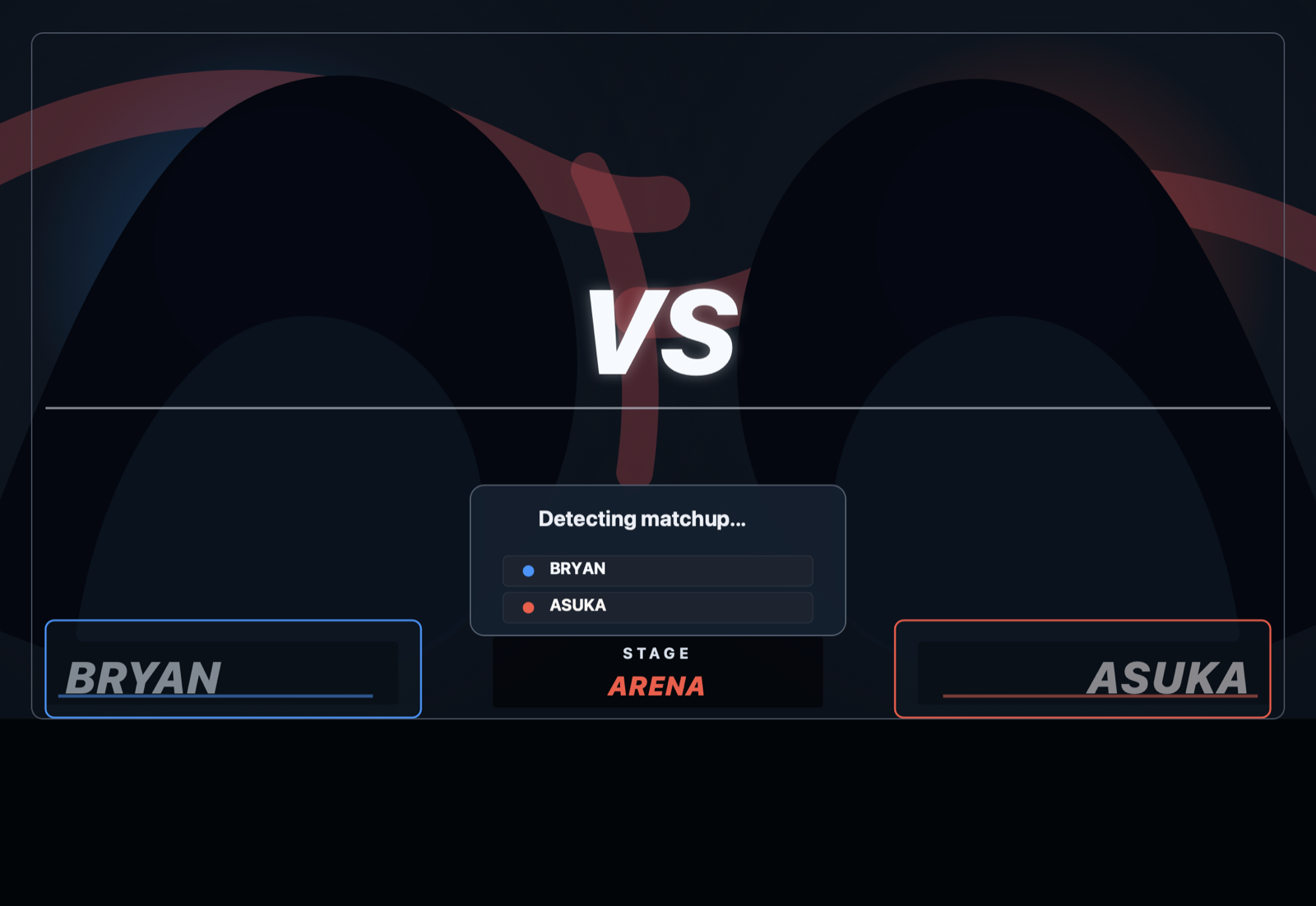

The VS screen shown is an illustration, not actual game footage.
KOBUSHI in 30 seconds
From match detection to writing your counters, live streams and upcoming tournaments — the whole flow.
Sound on. The VS screen shown is an illustration, not actual game footage.
Match Scan — it's already open before you reach for the mouse.
Those tens of seconds of loading before a match? KOBUSHI reads both character names off the screen and opens your matchup sheet automatically (a desktop-app feature).
Finds the game window by itself
Auto-detects the TEKKEN 8 window and watches for the VS screen. Manual capture via hotkey (Ctrl+Shift+K) or button is also available.
Everything stays on your PC
Recognition is pure on-device image processing. No screenshots ever leave your machine, and the game itself is never touched.
Instant, with a tiny footprint
Each scan is a ~0.1s image check. While auto-scanning, expect around 1% of total CPU on a PC that runs Tekken 8 — and scanning stops entirely while the game isn't running.
What you need for the matchup is on this screen.
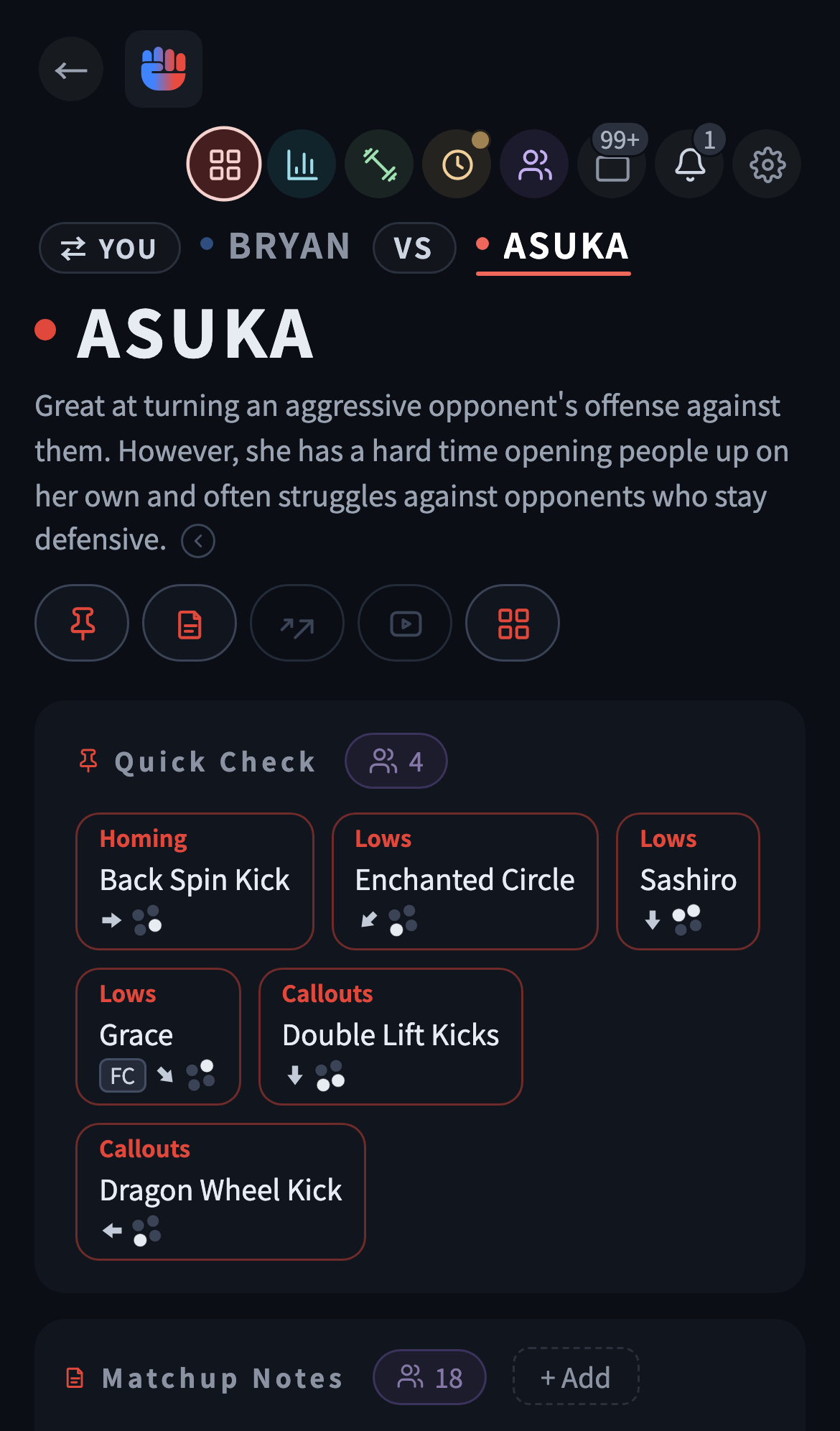
Switch between your character and your opponent's in one tap
Tap the VS panel to switch between your character and your opponent's. Both follow the same order — Quick Check (the essentials before a match) → Matchup Notes (your strategy) → Cards (moves grouped by theme) — so switching never leaves you lost.
- Every command rendered as button icons
- Block frames are color-coded — safe or punishable at a glance
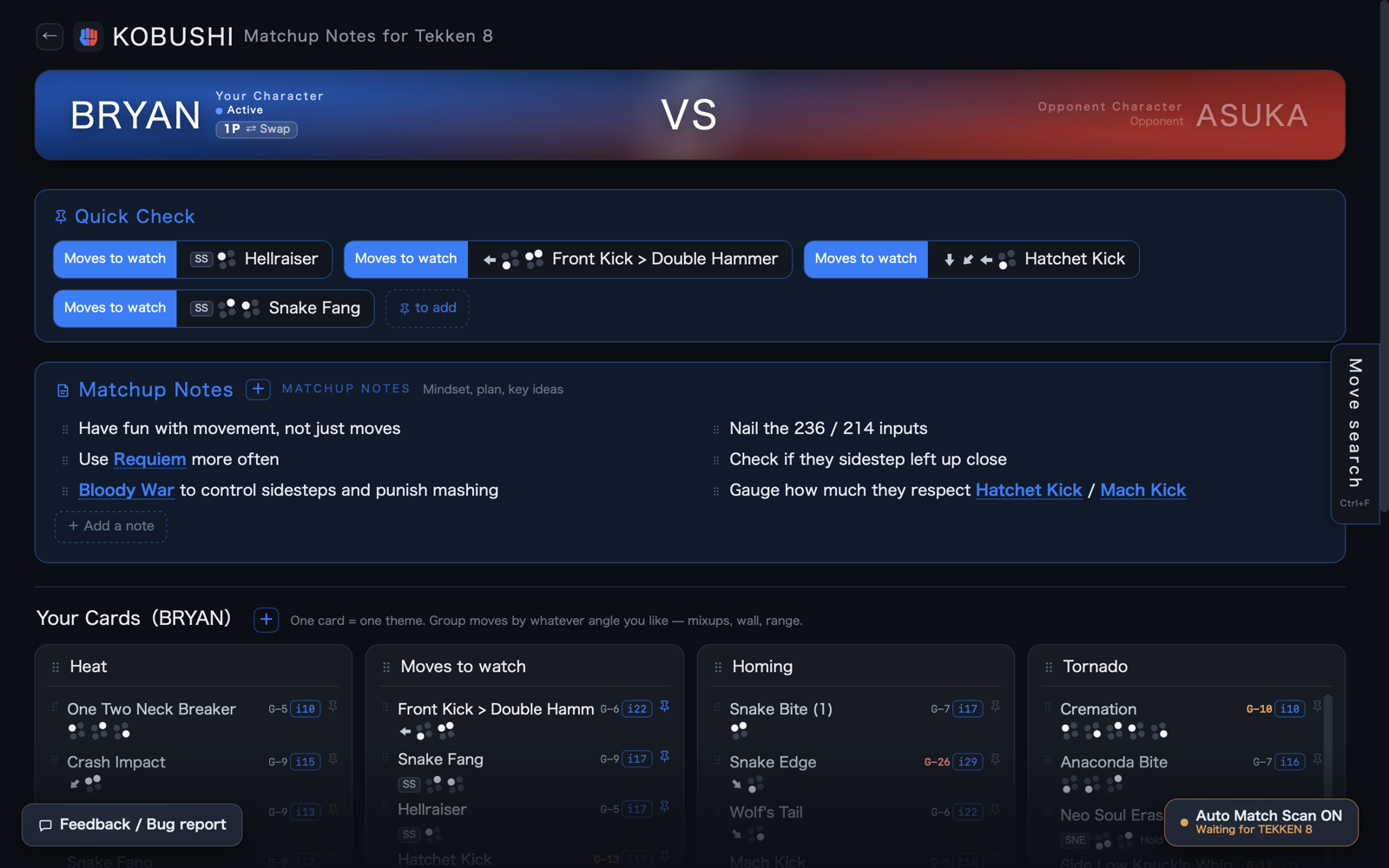
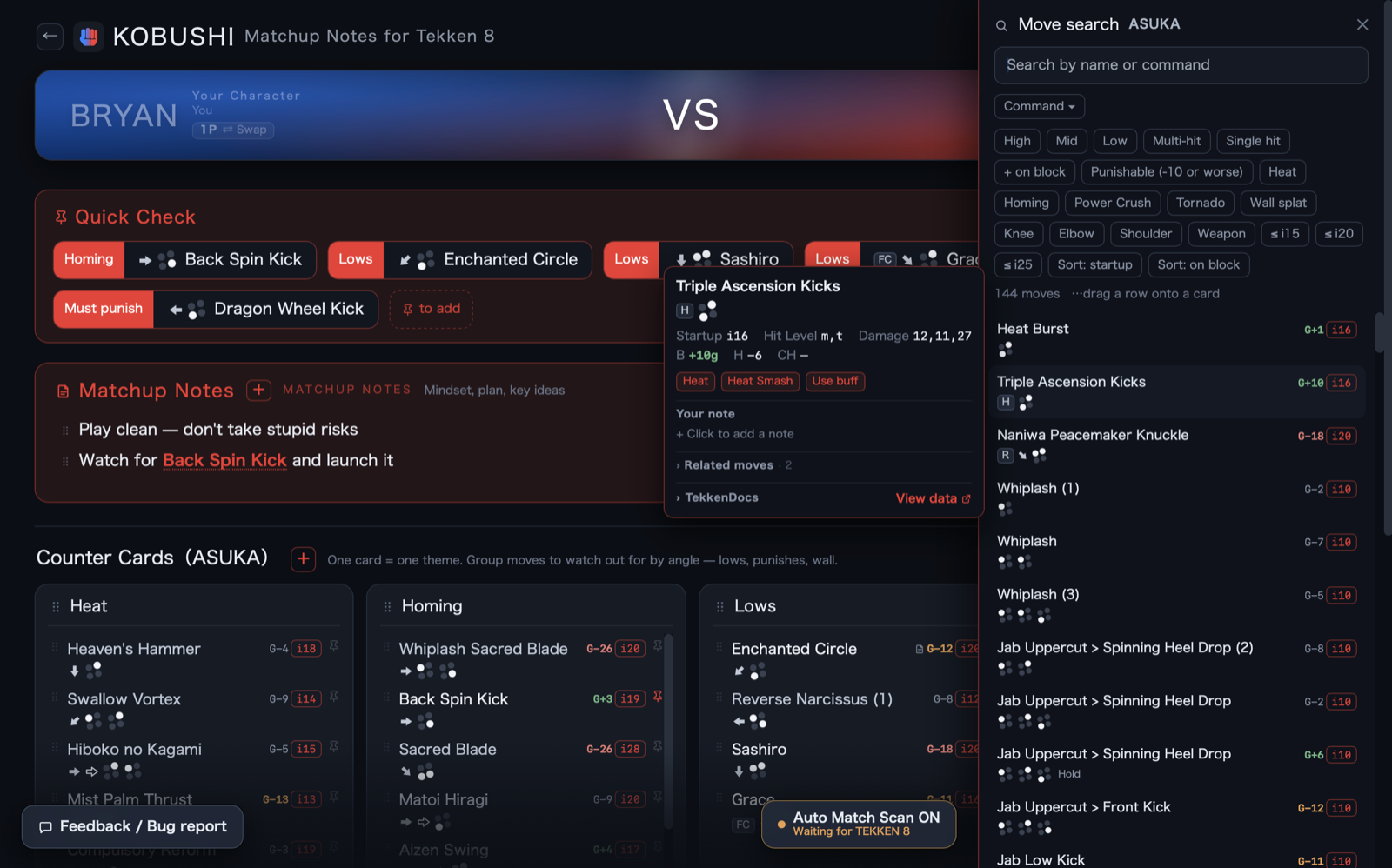
Move details on the spot — from search or from a card
Search by name, command input, tags (lows / heat / homing / punishable…) or startup frames. Whether the move is in your results or already on a card, touch its name for startup, hit level, block frames, hit states, move properties, related moves and your own per-move notes — with a TekkenDocs link when you want video.
- Per-move notes sync to the same move, wherever you write them
- Drag any result straight onto a card
What's happening in Tekken 8, inside KOBUSHI.
The same app you write your notes in also shows who is streaming right now and when the next tournament is.
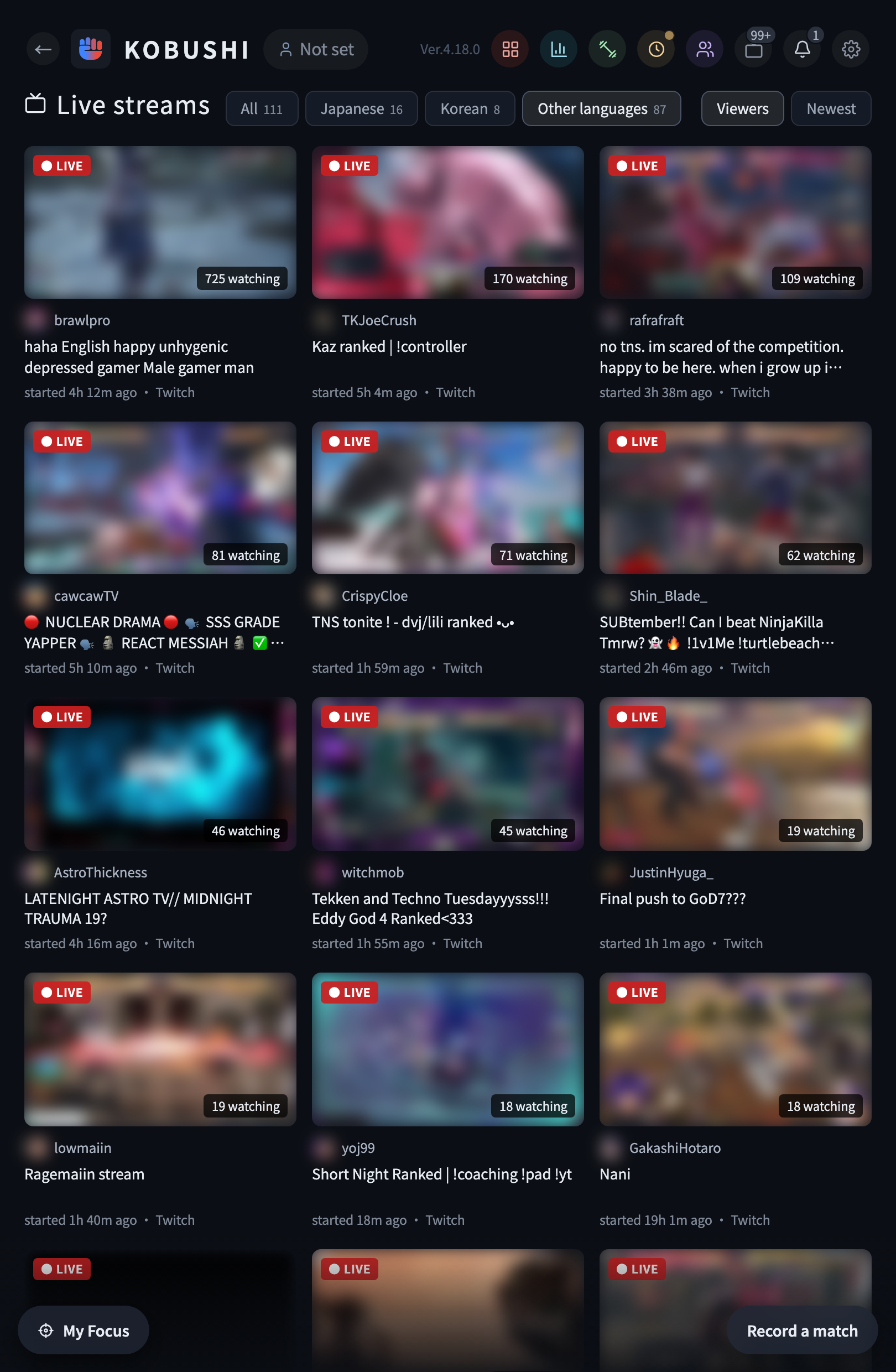
Tekken 8 live streams, ordered by viewers
Streams from YouTube, Twitch, CHZZK, SOOP and niconico are collected automatically. Filter by Japanese, Korean or other languages to find what you want to watch.
- Viewer counts refresh about every 5 minutes, and streams that end drop off on their own
- Tap one and the stream page opens directly

Note: thumbnails and channel icons are blurred.
Tournaments and meetups, in date order
Tekken 8 tournaments and meetups from start.gg and Tonamel are listed automatically. Filter by Japan or international, online or offline.
- Mark one as interested and it shows the days left
- Newly listed tournaments and meetups arrive as a notification

Note: sample data shown.
Your matches tell you what to write down.
Log a reflection after each match and what you don't yet understand about that character turns into numbers — including which card to fill in next.
Four ways a match can go wrong
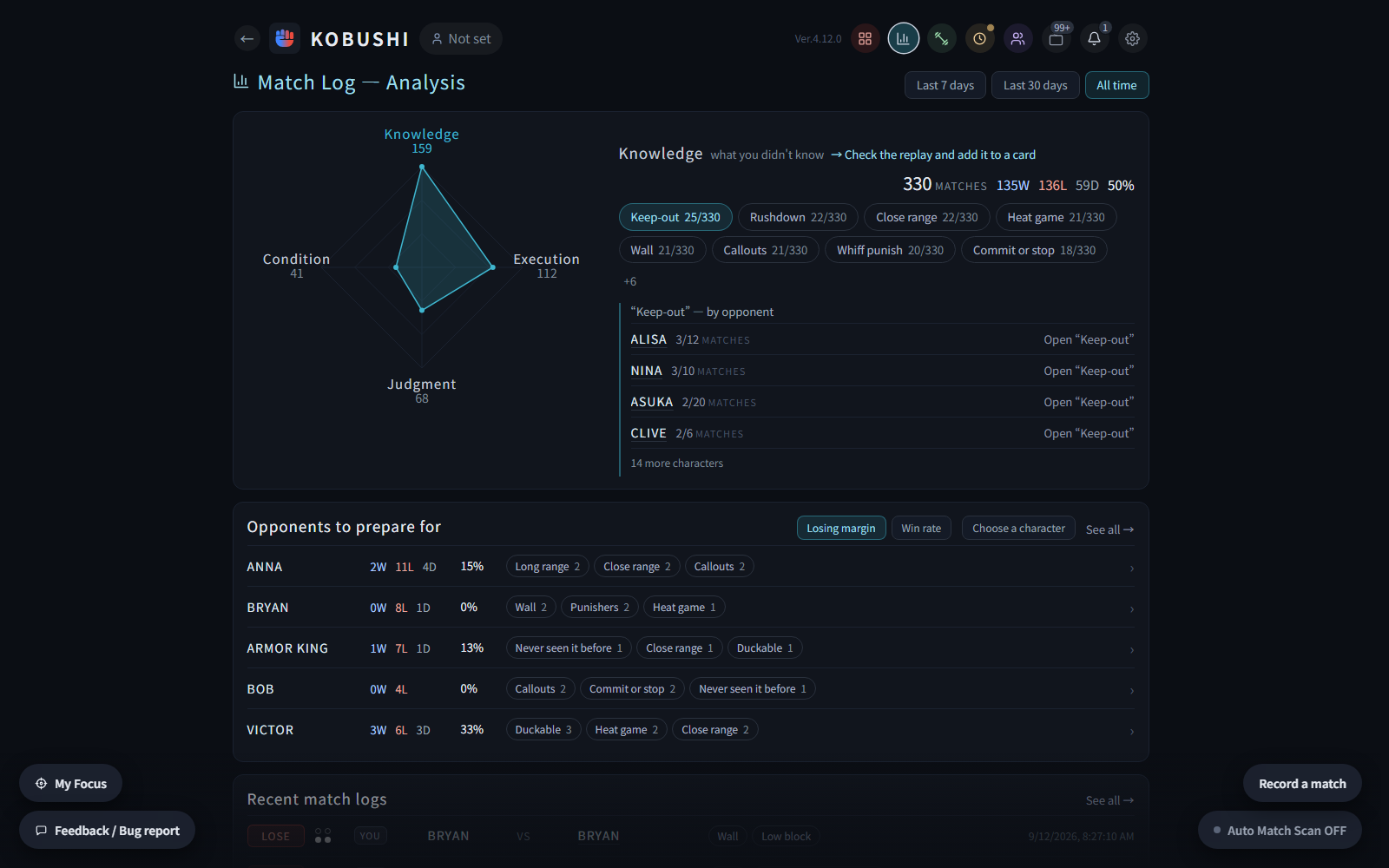
Record the result, then pick whatever applied that match: what you didn't know (Knowledge), what you knew but couldn't do (Execution), what you should have done differently (Judgment), and your own physical and mental state (Condition). Each group points somewhere different — Knowledge sends you to the replay and then to a card, Execution sends you to Practice.
- Knowledge tags carry the same names as your cards, so picking one already decides where you'll write it — and the breakdown links straight to that card
- See it split by opponent, and which characters you have a losing record against (last 7 days / 30 days / all time)
A record of when and how much you played
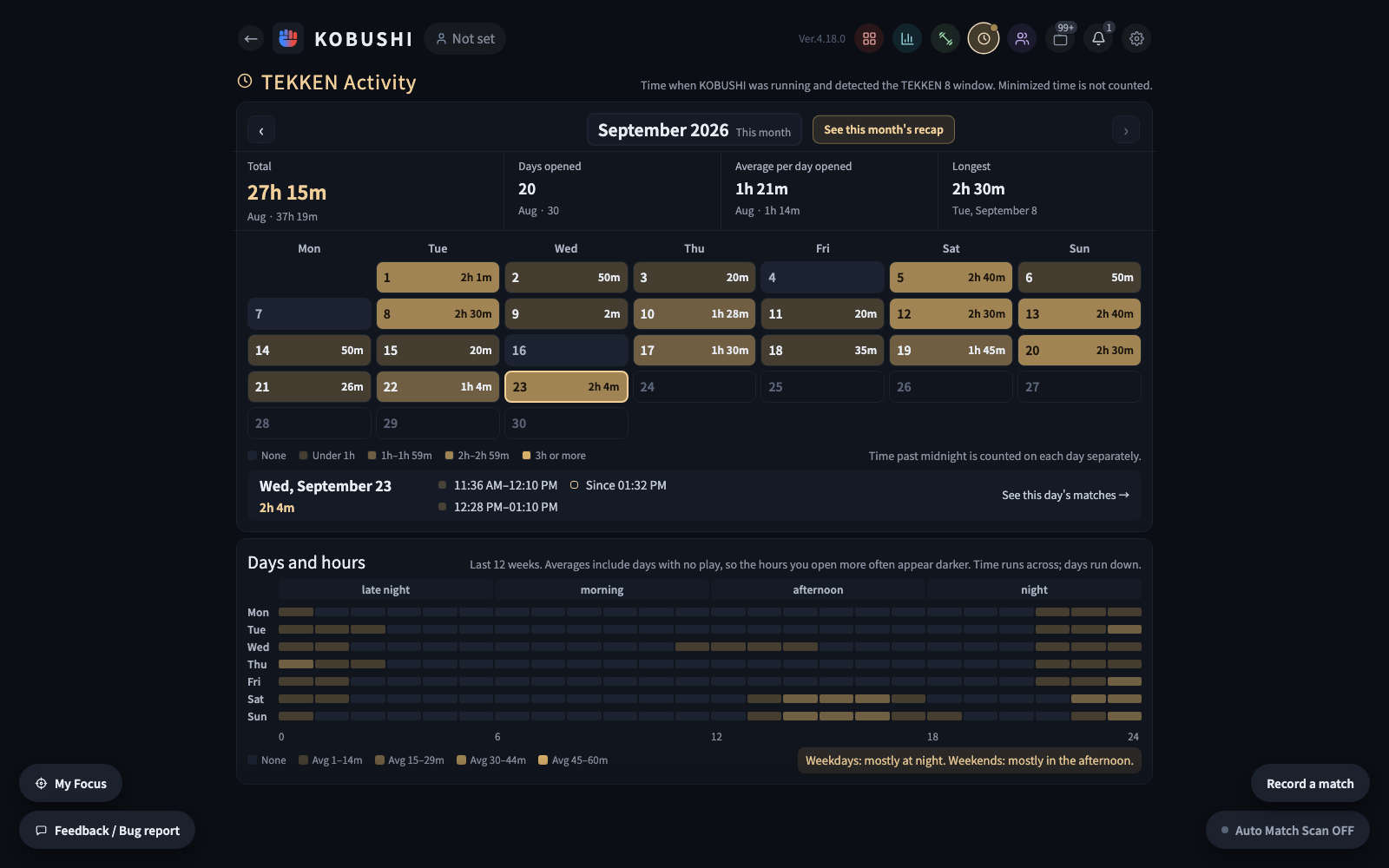
While KOBUSHI is running, it records the time it finds the TEKKEN 8 window, day by day. The monthly total, the days you played, your longest day, and the pattern across weekdays and hours.
- Jump straight to that day's match log
- The Windows app does the recording. You can read it on other devices too
Sign in, and the same gameplan on every device.
You sign in with Google or Discord, so your notes and cards are saved to the cloud automatically — open KOBUSHI on a PC, a phone or a tablet and the same gameplan is waiting.
Write it, and it's saved
There is no save button. Every edit is saved to the cloud automatically — and a warning appears only if something isn't working.
New device, same gameplan
Just sign in on a new device and all your notes and cards come back. Works across the Windows app and the web version too.
No account setup
Sign in with Google or Discord — no email forms, no passwords to manage.
Note: thumbnails and channel icons are blurred.
Add it to your home screen
In Safari, use the share button (□ with ↑); in Chrome, use the menu (⋮). Then choose "Add to Home Screen" — "Install app" on some devices.
Full screen, no address bar
It starts from the home screen icon just like an app. With no address bar or tabs in the way, a small screen goes further.
Platforms
| Windows app | Web (browser) | |
|---|---|---|
| Sheets, cards & notes | ✓ | ✓ |
| Frame data, move details & search | ✓ | ✓ |
| Match Log & analysis | ✓ | ✓ |
| Combos & Practice menu | ✓ | ✓ |
| Match Scan (auto recognition & switch) | ✓ | — |
Note: the web version also runs in a phone or tablet browser — add it to your home screen and it launches full screen, like an app.
STREET FIGHTER 6, now in KOBUSHI.
KOBUSHI supports both TEKKEN 8 and STREET FIGHTER 6. Sign-in and plan are shared, and the screen switches to the game you launch (a desktop-app feature).
SF6 characters, same sheets
Matchup sheets, Quick Check, matchup notes and strategy cards work for STREET FIGHTER 6 characters too.
Match Scan works in SF6
Reads the SF6 VS screen and opens your opponent's character sheet automatically.
Match log, just the same
Record results and reflections, and find your most common issues in the match log analysis. Kept separate from your TEKKEN 8 records.
Matchup knowledge, built together.
KOBUSHI is free because players build up and share their knowledge with each other.
What you enter helps everyone
The knowledge you enter in KOBUSHI is shared with the KOBUSHI community and shown to other users.
See others' answers on the spot
Community move notes appear right in the move details. Take an idea you hadn't thought of into your own notes with one tap.
Sharing is a condition of use
There is no setting to turn sharing off. Screenshots, and anything you haven't entered yourself, are never sent. Problem posts are handled by reporting and removal.
Pricing
All the core features are free on the Free plan. You can also read and adopt a selection of popular Quick Check moves and matchup notes from other players for each character. The Community plan gives you access to more of other players' knowledge, plus auto Match Scan. One plan covers both TEKKEN 8 and STREET FIGHTER 6.
When a new character is released, matchup knowledge is needed most — and that is when it starts coming in. Right now, other players' knowledge for BOB, the newest character released, is available to read and adopt on every plan.
| Free plan | KOBUSHI Community plan | |
|---|---|---|
| Edit sheets, cards & notes | ✓ | ✓ |
| Frame data, move details & search | ✓ | ✓ |
| Auto cloud save & restore on another device | ✓ | ✓ |
| Match Log & analysis | ✓ | ✓ |
| Live streams, Events & TEKKEN Activity | ✓ | ✓ |
| Combos & Practice menu | ✓ | ✓ |
| Manual Match Scan (button / hotkey) | ✓ | ✓ |
| Auto Match Scan (auto switch on the VS screen) | Trial: 7 days of use | ✓ |
| Read & adopt other players' knowledge | Partial | ✓ |
| Price | Free | $2.99/mo ($29.99/yr) |
Note: the monthly plan starts with 7 days free. After that it automatically renews at $2.99/mo. Cancel during the free period and you won't be charged.
Note: on the Free plan, you can try Auto Match Scan for a total of 7 days of use. No card needed.
Note: that knowledge includes Quick Check, card moves, move notes, matchup notes, sidestep, drills, combos, My Focus items, clips and card key points.
Note: for BOB, other players' knowledge is open on every plan (sign in required).
Note: sharing your knowledge is a condition of use on both the Free and Community plans (see "Matchup knowledge, built together." above).
Changelog
The main changes in each version. The desktop app checks for updates on launch and lets you update on the spot.
Ver.6.2.0Added My page; view-only when signed out2026-10-28
- You can now view My page, with your daily summary, monthly recap, and more. In the Match Log, opponents who have a My page get a purple mark next to their name
- Write a one-line note or a diary entry for each day in your daily summary
- KOBUSHI is now view-only when you are not signed in
- The top page now has one search box for characters, moves, and players
Ver.6.1.0A guide to what goes in which notes2026-10-26
- The "?" next to Matchup Notes now shows which counters go where: player notes, move notes, strategy cards, or matchup notes
- Other players' knowledge shown in an empty Quick Check or matchup notes now stays when you add one item. Remove the ones you don't need with each ✕
- Moves that can also be done from a stance now appear on that stance's card, in its filter, and in search
Ver.6.0.2Fixed disappearing player notes2026-10-24
- Fixed an issue where player notes added after importing matches from Wavu Wank could disappear when data was reloaded
Ver.6.0.1Smoother typing in player notes2026-10-22
- Fixed an issue where the text cursor in player notes would lose focus
- Fixed imports from Wavu Wank (Buckler's Boot Camp for SF6) splitting one match into two entries. Matches that were already split are merged back into one
- The match log now shows "Fetching at …" on entries that haven't been imported yet, including ones that already show a name
Ver.6.0.0STREET FIGHTER 6 support2026-10-21
- KOBUSHI now supports STREET FIGHTER 6. It's the same single app as TEKKEN 8, and the screen switches to the game you launch. Sign-in and plan are shared
- The Reflection row under player notes lets you tag a match and add a note right after you play it
- Matchup sheets for each opponent character: strategy cards, Quick Check, and a move list in Classic or Modern controls
- Match Scan, player notes, match log, tournaments and events, and Activity
- Fixed two Wavu Wank import issues: the same match appearing twice, and character names showing as "CHAR-…"
Ver.5.2.0Better opponent recognition in player notes2026-10-16
- When the name read on the VS screen is only similar to someone you've played before, player notes are now less likely to show the wrong opponent
- Opponents with Korean names now show their correct name
Ver.5.1.0Mash card in your Game Plan2026-10-14
- Game Plan now has a Mash card for moves that interrupt your opponent's pressure when you're at a disadvantage. Existing sheets get it as an empty card
- Player notes now show "First match" instead of a name for opponents you haven't faced before. You can write notes even when their name couldn't be read
Ver.5.0.0Player notes: keep notes on each opponent2026-10-12
- KOBUSHI reads your opponent's player name on the VS screen and shows your player notes on them in the sheet. If you've played them before, your record and notes are right there
- Register your Tekken ID in Settings to import your ranked matches from Wavu Wank into your match log, along with your opponent's name. Matches played without Auto Match Scan are recorded too
- Your opponent's name in the match log now opens their page, with your record against them, the characters they used, and your notes for each character
- Don't know your Tekken ID? Just play ranked matches and KOBUSHI will detect it for you to register
Ver.4.29.0niconico added to live streams2026-10-10
- niconico is now included in live stream listings
- Fixed the "How to use KOBUSHI" guide reopening a few seconds after you close it on first launch
- Fixed the opponent's player name not being saved when you record or edit a match log from the sheet screen
Ver.4.28.0Support KOBUSHI from the coffee cup in the header2026-10-09
- The coffee cup now lets you support KOBUSHI's development and upkeep, either monthly or with a one-time amount you choose
- The Matches by day section in Match Log — Analysis now sits right below the summary, so your daily match counts are visible right away
- Fixed layout issues on phones and made button sizes consistent in Settings and elsewhere
Ver.4.27.0A 4-panel guide to using KOBUSHI2026-10-06
- The "?" next to "KOBUSHI" in the header now opens a 4-panel guide to using KOBUSHI
- The "?" on the match log screen and Match Log — Analysis shows how to review your matches and use what you learn in the next one
- You can now try Auto Match Scan on the Free plan for a total of 7 days of use. When the trial ends, you'll see your matches for each day you used it
Ver.4.26.0Stance and step cards in your Game Plan2026-10-04
- Game Plan now has cards for each of the character's stances and steps, so you can note the moves to go for from each one on its own card
- Closing Out, Tracking Moves, and Mental Stack cards were also added. Existing sheets get them as empty cards
- Moves with strong homing to one side now show it in the sidestep section, such as "Strong homing vs left sidestep"
- The sheet screen now has a Character search (Ctrl+K) tab on its right edge
Ver.4.25.0My Focus move colors now match your side2026-10-03
- Move names in My Focus are now colored by the side you're playing on (1P blue / 2P red), the same as the sheet
- Fixed move info covering the cards in the Game Plan detail view
Ver.4.24.0See how Quick Check and My Focus work in a diagram2026-10-01
- The "?" next to Quick Check, My Focus, and Game Plan cards now opens a diagram of how they work. It shows where the moves you mark on a card appear when a match starts. We also made other small improvements
Ver.4.23.0Faster character switching2026-09-30
- Switching characters with Ctrl+K or the character names at the top now shows the sheet sooner. We also made other small improvements
Ver.4.22.0Other players' key points now arrive at the bell2026-09-29
- Key points that other players write on their Game Plan cards now arrive at the bell. You can read them all on one page, and adding one puts it into your card with the same name (Community plan)
- Fixed an issue where opening a move's details from My Focus closed the whole panel. We also made other small improvements
Ver.4.21.0Add Game Plan moves to My Focus2026-09-28
- Moves and key points on Game Plan cards can now go into each character's My Focus list. They appear with the card name and open the original card when selected
- Key points can now be split into separate items and added to Quick Check too
- Moves that other players put in Quick Check or My Focus are now listed with their card names. Their key points now appear in the same lists, and adding one puts it into your card with the same name (Community plan). We also made other small improvements
Ver.4.20.0Put moves into a card's Key points2026-09-26
- Key points on a Game Plan card now take a move at the spot you drop it from move search. You can switch between the move name and the command on the spot, and touch a move to open its frame data
- Community key points show other players' moves the same way, and the moves come along when you add someone's text to your card. We also made other small improvements
Ver.4.19.0Live streams now appear at the top of the home screen2026-09-25
- The home screen now shows live Tekken 8 streams at the top, so you can see what's available to watch at a glance
- When a tournament or meetup is being streamed, a Live event banner appears. You can open the stream or event details directly, and live events are also marked in the events list
- The home screen header now has the same buttons as every other screen, so you can go straight from the home screen to new notes, live streams and Tekken activity. We also made other small improvements
Ver.4.18.0Switch the Game Plan tab between grid and single-card views2026-09-21
- The Game Plan tab now has a view switch: Grid shows your cards together, while Detail opens them one at a time
- Card text sizes are now consistent across the sheet, plus other small improvements
Ver.4.17.0Game Plan cards now open one at a time2026-09-20
- The Game Plan tab now opens one card at a time from the card index, so you can focus on the card you selected
- Each card now has a Key points section, where you can organize what to watch for alongside the moves you use in that situation
- Added Community key points. Read what other players wrote and add the useful ones to your own card (Community plan), plus other small improvements
Ver.4.16.0See your most-played character in the match calendar2026-09-17
- The calendar in Match Log Analysis now shows your most-played character for the day or month you select
- Move search now finds moves that use simultaneous button presses even when you type them without "+", plus other small improvements
Ver.4.15.0Character overviews for all 42 characters and customizable sheet sections2026-09-16
- Sheets now include a Character overview: a one-sentence summary of each character's fighting style and key weaknesses, shown next to the character's name
- Use the buttons at the top of the sheet to show or hide Quick Check, Matchup Notes, Combos, Clips, and Strategy Cards. Plus other small improvements
Ver.4.14.0Suggestions for an empty Quick Check or matchup notes2026-09-14
- Suggested moves and notes can now be added to your own sheet just by checking them, plus other small improvements
Ver.4.13.0Korean is now available as a display language2026-09-13
- You can now choose Korean (한국어) under Language in Settings
- Monthly Recap posts on X now include a link to the KOBUSHI site, plus other small improvements
Ver.4.12.0A new app icon with a clearer clenched fist2026-09-12
- The app has a new icon. The clenched fist is easier to recognize, and the blue and red halves stand for the two players in a match
- Monthly Recap posts on X now include the name TEKKEN 8, plus other small improvements
Ver.4.11.0New Monthly Recap turns your month into an image to post on X2026-09-12
- Each month, the time you had TEKKEN 8 open and your online match record are turned into an image. Post on X gets the image and text ready for your post
- The bell in the header is now Notifications, and a notice arrives when your monthly recap is ready
- The whole app now uses a new, easier-to-read font
- The Stance filter in move search now also lists stance moves used during Heat and similar states, plus other small improvements
Ver.4.10.0New Matches by Day calendar shows your results for each day2026-09-11
- Match Log Analysis now has a calendar. Days are shaded by how many games you recorded, and selecting a day shows the wins, losses and win rate for that day's matches and games
- You can also see totals for the whole month, and open the match log list or TEKKEN Activity for the date you picked
- Fixed a blank screen in the web version on older browsers, plus other small improvements
Ver.4.9.0Add Clips — share YouTube and X videos on your character sheets2026-09-09
- Your character sheet now has a Clips section. Paste a YouTube or X video URL and open the videos worth studying right from the sheet
- You can also see the clips other players have added and adopt them into your own sheet, and new ones arrive at the bell (Community plan)
- Fixed move commands that were showing an input which didn't match, on moves that go into a stance and elsewhere
Ver.4.8.0See the breakdown of each match in the match log list2026-09-06
- The match log list now shows the breakdown of each match, so you can tell a 2-0 from a 2-1 without opening the record
- On the home screen, Character Sheets now lists the most recently added characters until you open your first sheet, so you can open one right away
- Fixed hit states such as "Down" on moves that stop partway through a string — they were showing the state for the full string
- Match Scan now tells you when it can't capture the game screen, plus other small improvements
Ver.4.7.0Match logs are created automatically from the result screen2026-09-05
- Match logs are now created automatically after a match. The opponent, the result, and which games you won are all filled in — you only open it to write your notes
- Works for both Ranked and Quick Match. A run of matches stays as one log, and the breakdown grows as you keep playing
- The record button lights up when a match is recognized, so you can check what was read at a glance. You can fix any game in the breakdown by tapping it
- The update notice now shows a heading for each version, plus other small improvements
Ver.4.6.0New TEKKEN Activity shows the time you had TEKKEN 8 open2026-09-04
- Open TEKKEN 8 while KOBUSHI is running and the time is recorded automatically. See this week's total on the home screen, and today's records from the clock in the header
- The detail screen shows this month's total and daily average, a calendar of the last 12 weeks, and the hours you play most often
- Updated some of Bob's frame data, plus other small improvements
Ver.4.5.0Insert moves into My Focus from any screen2026-09-01
- You can now use "Insert move" for a character-specific focus from any screen. If move search isn't available there, KOBUSHI takes you to your sheet and resumes at the same draft and cursor position
- Press Ctrl+Enter in My Focus to finish the current item and add the next one directly below. Feedback when Match Scan recognizes a matchup is clearer too
- Move search now finds moves by their Homing L and Homing R tags, and the Hard to step filters include moves with direction-specific homing
- Live streams and player-shared knowledge now use less data. We also expanded transition and cancel move variants and made other small improvements
Ver.4.4.0Open Character Search and All-Move Search with keyboard shortcuts2026-08-31
- On the home screen, Ctrl+K now opens Character Search and Ctrl+F opens All-Move Search
- Fixed My Focus on phones so the keyboard no longer hides the field or causes the page to zoom while you edit
- Live stream listings on phones now use compact horizontal cards, so you can see more streams at once. Plus other small improvements
Ver.4.3.0A new My Focus space for what you are working on2026-08-31
- New My Focus — jot down what you want to focus on and the moves you want to use, then review them before a match. Keep separate lists for Common and each character, and open them any time from the button at the bottom left
- My Focus opens automatically when Match Scan recognizes a matchup. It is on by default, and you can turn it off right inside My Focus
- SOOP is now included in live stream listings. We also fixed an issue that could prevent editing move-note text on phones
Ver.4.2.0Watch moves in a small TekkenDocs window2026-08-28
- Move details now show a play mark — press it to open the move's TekkenDocs page in a small window and see the move in motion (Windows app; the web version opens a new browser tab)
- Event filters can now be combined — pick Online together with Japan or International to list just the online tournaments you want
- KOBUSHI now warns you when device storage is nearly full, and tells you right away when something couldn't be saved. Plus other small improvements
Ver.4.1.0Online tournaments and expanded event listings2026-08-27
- Events now list tournaments and meetups from Tonamel automatically, giving you many more events to discover. Online tournaments are included too, with filters for Online and Offline
- The Attending mark on events is now called Interested, making it easier to save events that catch your eye
- Fixed an issue where notes you had read could still be marked as unread under New. Plus other small improvements
Ver.4.0.0Live streams and events2026-08-26
- You can now browse Tekken 8 live streams in one place. They are gathered from YouTube, Twitch and CHZZK, sorted by viewers, and a new header button opens them without leaving your sheet
- Tournaments and meetups now appear in date order. Anything on start.gg is listed automatically, you can filter by Japan or International, and marking an event as Attending shows the days until it starts
- Move search now works with stance names too — Full Crouch, While Rising and the rest — and with commands typed without the dot. Plus other small improvements
Ver.3.9.0A redesigned sheet screen2026-08-25
- The big VS panel at the top of the sheet is gone — it moved into the header, giving your notes more room. Change characters and switch between your sheet and the opponent's right from there
- Characters now sit in the same left/right order as the actual match (1P = blue, 2P = red). Swap your side with the "You" button, and match log entries keep the sides they were recorded on
- Quick Check and Matchup Notes now open and close together. While closed they fold into a single line with their counts. Plus other small improvements
Ver.3.8.0Catch up on updates at a glance2026-08-24
- After updating, the what's-new notice now shows every change since the version you were on
Ver.3.7.0Match Scan runs lighter2026-08-24
- Improved performance in cases where Match Scan processing could become heavy
Ver.3.6.0Record the opponent's player name in your match log2026-08-24
- You can now record the opponent's player name in your match log. Filter by name to look back over your matches and your record against that player
- Greatly expanded BOB's frame data. Damage, startup and more are now filled in for nearly the whole move list, with links to watch each move in action
- Move data now shows chip damage on block, and marks the moves that use up Heat
- Improved move search accuracy, plus other small improvements
Ver.3.5.0Reorder and archive practice menus2026-08-22
- Practice menus can now be reordered however you like, and finished ones can be archived out of the list
- Fixed the Back action taking you out of KOBUSHI
- Corrected BOB's frame data, improved move search, plus other small improvements
Ver.3.4.0Added BOB's move data and frame data2026-08-21
- Added the move data and frame data for the newest released character (BOB)
- Signing in with a different account on the same device now switches your data automatically
- Plus other small improvements
Ver.3.3.0The newest released character is now open on the Free plan2026-08-20
- The Free plan now includes the community features for the newest released character (BOB). Browse and adopt the matchup notes, combos and practice menus other players have shared, just as they are
- Each community screen now shows its own unread count for move notes, matchup notes, practice menus and combos
- The new-arrivals bell and the "New" count on the home screen no longer disagree with what you can actually see
- Plus other small improvements
Ver.3.2.0Community notes can now be shown machine-translated2026-08-19
- Community notes can now be shown with machine translations for users of other languages. The translations are provided by KOBUSHI and were not written by the original authors (the Terms and the privacy policy have been updated)
- The monthly Community plan now starts with 7 days free. It renews automatically after that
- The browser version and the phone app now show the current version in the header and in Settings
- Fixed places where Japanese text was still showing in the English display, plus other small improvements
Ver.3.1.0All-Move Search: search every character's moves at once2026-08-19
- Added All-Move Search on the home screen, so you can search every character's moves at once. Search by command to show only moves that start with what you typed
- You can now reopen the updater from the header or Settings. If an update fails, the reason appears there and you can retry
- Pressing Backspace or Alt+← while writing a combo or match log no longer takes you back to the previous screen. You'll now be asked for confirmation before closing an unsaved edit
- The Quick Check, Matchup Notes, and Combos bands at the top of the sheet now have a quieter look without the red frames. Plus smaller improvements
Ver.3.0.1Usage measurement now records where you opened it from2026-08-18
- The usage measurement sent at startup now includes where the App was opened from (app / home screen / browser). Your device model, OS version, browser and screen size are not included (the privacy policy has been updated)
Ver.3.0.0Now works on phones and tablets2026-08-17
- KOBUSHI now works on phones and tablets. Open the browser version on your phone or tablet and add it to your home screen, and it launches full screen, like an app. The steps are under "Works as a mobile app" on KOBUSHI's home screen
- Community Combos now also appear under New and in the community lists, so you can adopt another player's combo on the spot
- Fixed Match Scan sometimes never responding when the screen is dark
- Fixed combos being saved to a different character. Plus smaller improvements
Ver.2.8.1Fixed shared content being posted twice2026-08-17
- Fixed an issue where, on a device you had signed out of, what you share could be posted to the community a second time
Ver.2.8.0A Combos section on your character sheet2026-08-16
- Your character sheet now has a Combos section. Build the starter and the recipe straight from the move search, and adopt combos other players share from Community Combos
- Added 1,039 stance-transition and cancel follow-ups as moves. Inputs you could not pick before are now searchable, and work as parts of combos and cards
- Game plan gained a Floor Break card, and cards now sit in the same positions on every character's sheet
- Fixed unrelated moves appearing under Related moves, and moves that could not be found by their Japanese-style command. Plus smaller improvements
Ver.2.7.0The "Use your cloud data?" prompt is gone2026-08-14
- The "Use your cloud data?" prompt has been removed. Write on your PC and your phone separately — both sides' edits are kept
- Deleted cards and notes no longer come back from another device. Plus smaller improvements
Ver.2.6.0Write drills as "their move × your move"2026-08-13
- Drills now have two character fields, yours and your opponent's. You can write "answer this move of theirs with this move of mine", and the moves you add are shown in blue for yours and red for theirs
- A move's details now let you pull up the drills that use that move. Community drills can also be filtered by the opponent's character and by your own
- Matchup notes now take a move at the spot you drop it, like drills already did. Moves inside your text can be shown as command icons, and you can switch between the move name and the command on the spot
- Fixed a bug where the app could switch to a different character on its own while you had a character sheet open. Plus smaller fixes
Ver.2.5.0Work from different devices is merged instead of picked2026-08-12
- Cloud save now merges instead of asking you to pick one side. Write on your PC and your phone and both are kept. If you edited the same note on both, the newer edit wins
- The "Use your cloud data?" prompt now appears only when the same character sheet was edited on both devices (or your settings differ)
Ver.2.4.0Shared content can no longer be lost2026-08-12
- Rebuilt community sharing so what you share (move notes, matchup notes, sidesteps, drills) can no longer disappear because of switching devices or how a restore went. Shared content is removed only when you delete it yourself
- Fixed the cloud-save prompt reappearing over and over after choosing "Use this device's data"
Ver.2.3.1Fixes shared content sometimes disappearing2026-08-12
- Fixed a bug where signing in on a second device (or a freshly reset browser) could wipe what you had shared with the community, such as your sidestep entries
Ver.2.3.0A redesigned Character Sheets list, moves in your drills, and more2026-08-11
- The Character Sheets list has been redesigned. Mark the characters you play yourself, and see how far your prep has come from the colours and the progress line
- You can now put moves into a drill's name and how-to notes. Press a move name to check its frame data right there
- Removed Recent matches from the Match log: replays and stage changes were listing matches you never actually played. Plus smaller fixes
Ver.2.2.0Practice menu, Community drills, and more2026-08-09
- Added the Practice menu. Register the drills you want to repeat and just tick the days you did them. A four-week calendar on the home screen shows how well you are keeping it up at a glance
- Each drill's detail page shows the days you did it and the notes you left, plus a monthly graph of how many matches you played with the character and category you tagged it with
- Added Community drills. See the drills other players have registered and adopt them into your own practice menu (Community plan)
- The app now starts on the home screen (restart within 30 minutes and it returns to where you were). Also fixed issues around Match Scan and Recent matches
Ver.2.1.1A fresh new look, better Match Scan recognition, and more2026-08-08
- The whole app has a fresh new look: a new home screen, a new typeface, and a shared header on every screen that makes it easier to move around
- Fixed an issue where Match Scan sometimes failed to read a character name even though it was clearly on screen, so the sheet did not switch
- You can now filter moves in the search palette by how easy they are to sidestep (left / right, weak / strong), based on what you have recorded
- To improve Match Scan accuracy, the app may automatically send measurements of screens that could not be recognized and information about the capture method (the privacy policy has been updated). Screen images and player names are not included
Ver.2.1.0Record which way to sidestep, move by move2026-08-07
- You can now record how easy a move is to sidestep, separately for left and right, on a three-step scale. Once recorded, an L / R mark appears on the move row so you can see it at a glance
- Homing moves are marked as "cannot be sidestepped" from the start. This comes from the frame data, so it shows up without you recording anything
- Community sidestep shows how other players read the same move, and you can adopt the most common assessment in one tap
- Fixed an issue where pressing Esc inside the move search window also closed the search window itself, plus smaller improvements
Ver.2.0.3The card tab you have open now stays open2026-08-05
- The card tabs on a sheet (Gameplan / Move Lists) no longer switch on their own when Match Scan changes your opponent or when you move to another sheet. The tab you had open stays open
- Fixed an issue in New notes where the unread count didn't go down after moving between the move note and matchup note tabs, plus smaller improvements
Ver.2.0.2Fix: data could be lost when using several devices, and more2026-08-04
- Fixed an issue where match logs and notes could be lost when you use more than one device. If both devices have edits, the App now asks which to keep — and match logs are kept from both sides
- Changes saved on another device now arrive even if you leave the App running. They are picked up when you return to the window
- When something goes wrong, the App now sends troubleshooting information automatically. Only the type of event, device information, and — for Match Scan — the numbers used in the decision are sent; screen images, player names and your note text are not (the Privacy Policy has been updated)
- Home / End now jump to the top and bottom of a sheet, plus smaller fixes
Ver.2.0.1Fix: match logs weren't saved to the cloud2026-08-04
- Match logs are now saved to the cloud along with your backup. This also fixes an issue in Ver.2.0.0 where match logs could be lost after syncing with another device
Ver.2.0.0Match Log and Match Log Analysis added, and more2026-08-03
- New "Match Log": after each match, record the result and how it went wrong (Knowledge, Execution, Judgment, Condition). Each group points at a different next step
- New "Match Log — Analysis": see what keeps costing you matches, character by character, and go straight to the card to write it down (match logs are stored on this device; cloud saving is planned for a future update)
- Move search can now send a move straight to your Quick Check, and the 0 key files it under "Moves to Watch"
- Fixed a brief flash of the wrong content on load, plus small improvements
Ver.1.5.1Fix: your shared moves didn't show up in "Everyone's"2026-08-01
- Fixed an issue where moves you shared didn't show up in "Everyone's Quick Check" and "Everyone's card moves". Once you update to this version and launch the app, your shared moves are re-published automatically
Ver.1.5.0One sheet per character, and a full list of Everyone's matchup notes, and more2026-08-01
- Sheets are no longer split into "your character" and "your opponent's character" — there is now one sheet per character. What you throw out and what you want to block is the same knowledge, so the same sheet opens from either side (your existing data is merged automatically on launch)
- Added a full list page for "Everyone's matchup notes". The new-notes bell now has "Move notes / Matchup notes" tabs, so you can read through what other players wrote and adopt it in one place (Community plan)
- Note lists are now paged, and the heading and tabs stay pinned as you scroll. Also fixed an issue where your own posts could be missing from "Your notes"
- Character names can now be found by typing them phonetically in Japanese. Ctrl+Shift+F clears every filter and starts a move search over. Japanese input no longer misfires while searching
Ver.1.4.0Cards are now organized into two tabs, and Everyone's card moves is here, and more2026-07-31
- Cards in a sheet are now split into two tabs, "Game plan" and "Move list", so the cards you think through yourself no longer get buried under the ones built automatically (the ⠿ handle moves cards between tabs, swaps them, reorders rows, and card height is adjustable). Card names and suggestions now read in English as well
- Added "Everyone's card moves" — for each card name, see how many players keep that move and adopt it into your own card (Community plan)
- Command search now understands numpad notation, so "6n23RP" finds the move as written (switch it in Settings → General; English starts on the standard notation)
- Notes are nicer to write. Ctrl+Enter confirms a note and starts the next one right away, and Esc now simply ends editing instead of leaving the sheet
Ver.1.3.0Added Everyone's quick check and Everyone's matchup notes, and more2026-07-29
- Added "Everyone's quick check" — see how many players have adopted each move for that character, and add it to your own quick check on the spot (Community plan)
- Added "Everyone's matchup notes" — read what other players worked out and adopt it. Moves mentioned in the text open their move info directly (Community plan)
- YouTube and X links written in your notes are now clickable. You can also report a post you're concerned about, right where you see it
- Fixed an issue where Match Scan could stop during a session and never resume. Reading on bright screens and typing responsiveness in notes are also improved
Ver.1.2.0New community move notes now come to you, and more2026-07-27
- New move notes from other players now arrive at the bell icon. Sort them into Unread / Later / Read and adopt them into your own notes on the spot (Community plan)
- Added "Everyone's move notes" — filter by character, sort by adoptions or newest, and review the notes you wrote yourself in one place
- Move notes are now shared one note at a time. Adopted notes are listed separately per author, and each shows how many players adopted it
- Deleting a move note now takes two steps, so you can't remove one by accident
Ver.1.1.1Fix: the window opened by itself at PC startup, and more2026-07-26
- Fixed an issue where KOBUSHI's window opened by itself when your PC started, even though you never turned that on (restoring a backup was silently clearing the tray setting)
- Fixed an issue where Match Scan could fail to read character names on bright screens
- Fixed an issue where a previously used name could still appear on community notes after you cleared your player name (leave the name blank to stay anonymous)
- Fixed an issue where the same note could appear several times in community notes
Ver.1.1.0The window opens itself when TEKKEN 8 starts, and more2026-07-25
- KOBUSHI's window now opens by itself when TEKKEN 8 starts (turn it on in Settings). It waits in the system tray from startup, and the × button keeps it there
- After an update, the first launch shows what changed in that version (the full changelog is linked from Settings)
- Community plan members can manage payment and cancellation from Settings
- Switching characters now resets the move search, plus small fixes around launch
Ver.1.0.2Fix: signing in didn't unlock the Community plan, and more2026-07-25
- Fixed an issue where you stayed on "Free" after signing in, so community notes and Auto Match Scan remained locked
- KOBUSHI now tells you when you get the Community plan and turns Auto Match Scan on (you can turn it back off right there)
- Signing in now completes in one go (it could previously require a second attempt)
- Removed flicker in the plan display, plus small improvements
Ver.1.0.1Community features launch, console Match Scan, and more2026-07-24
- Community move notes launch. Read matchup answers written by other players and take them into your own notes with one tap (Community plan)
- Match Scan now supports consoles (PS5/Xbox, etc.) — KOBUSHI reads the window your capture card and streaming software show on your PC and switches sheets automatically
- Match Scan now works correctly when you play Tekken 8 in windowed mode too
- Scan failure reports, a warning when the hotkey clashes with another app, and other small improvements
Ver.0.12.0Keyboard-driven sheets, undo/redo, and more2026-07-23
- Many new keyboard shortcuts — search for moves, add them to cards and switch characters without touching the mouse (press Ctrl+/ for the full list)
- Undo / redo for adding, deleting and moving move rows (Ctrl+Z / Ctrl+Y)
- Card layouts are now remembered per column count (your 3-column and 4-column arrangements each stay the way you left them)
- Fixes and small improvements around duplicate sheets and cloud saving
Ver.0.11.0Responsive card layout, refreshed move rows, and more2026-07-22
- Card columns now adapt to the window width (no more broken layouts in Stream Mode or smaller windows)
- Refreshed move row design with more readable frame badges (startup / on-block)
- Faster manual match scan
- New cloud-saving warning indicator, plus various display fixes
Ver.0.10.0Stream Mode, faster auto match scan, and more2026-07-21
- New Stream Mode for streamers: keep your matchup cards, quick checks and notes around the game frame, ready to capture in your streaming software — and edit them while you stream
- Faster auto match scan
- Sheet list now highlights the sheets you've edited at a glance
- Small improvements to move rows and Settings
Ver.0.9.0Auto-generated "Lows" and "Plus on block" cards, and more2026-07-18
- "Lows" and "Plus on block" cards auto-generated for every character (added once to existing sheets too)
- Multiple notes per move
- New move search filters: While Standing / Full Crouch / Sidestep
Ver.0.8.0Fixed character recognition for ARMOR KING, and more2026-07-17
- Fixed matches against ARMOR KING sometimes not opening a sheet
- Easier card creation: click or drop a move at the end of the list to make a new card
- Small improvements to move hovers
Ver.0.7.0Much more accurate move details, and more2026-07-14
- Greatly improved accuracy of the on-hit state (launch / knockdown / tornado) on move hovers
- "Lows" card auto-generated for new sheets
- Stance / power-up filters and better sorting in move search
- Fixed duplicate sheets for LAW
Ver.0.6.2Provisional support for viewing on smartphones2026-07-13
- The web version can now be viewed on phones with pinch zoom
Ver.0.6.1Fixed the scan getting stuck on "waiting"2026-07-12
- Fixed TEKKEN 8 not being detected on some setups, leaving auto match scan stuck on "waiting"
Ver.0.6.0Major drag & drop improvements, and more2026-07-12
- Move rows can be dragged freely between cards
- Move search understands repeated directions ("fff" finds dash moves)
- Small fixes to drag visuals and auto match scan
Ver.0.5.0Sequential-input move search, card checklists2026-07-12
- Move search understands sequential digits ("12" finds 1,2 strings)
- Adding a card opens a checklist of suggested moves to add in bulk
- Auto-generated cards are fully editable (locks removed)
Ver.0.4.0Auto-scan for online matches only, and more2026-07-11
- New setting to limit auto match scan to online matches (no false triggers in practice mode)
- Counter-hit frame values and other small improvements
Ver.0.3.0Support for the ranked-match VS screen2026-07-11
- Match scan now works on the ranked VS screen (with rank display)
Ver.0.2.0Automatic updates on launch2026-07-11
- The app notifies you of new versions on launch and updates in place
FAQ
Is it free?
Yes. Editing sheets, cards and notes, frame data, move search, and cloud auto-save are all free. On the Free plan, you can also read and adopt a selection of popular Quick Check moves and matchup notes from other players for each character. The Community plan ($2.99/mo, first 7 days free) gives you access to more of other players' knowledge, plus auto Match Scan. You can also try Auto Match Scan on the Free plan for a total of 7 days of use. Right now, BOB's knowledge is available to read and adopt on every plan. See Pricing for details.
Is what I enter shared?
Yes. KOBUSHI is free because players build up and share their knowledge with each other. The knowledge you enter in KOBUSHI is shared with the KOBUSHI community and shown to other users. Screenshots, and anything you haven't entered yourself, are never sent. You can see the full list of what is shared in the app under Settings → Support & info. There is no setting to turn sharing off — sharing is a condition of use. Problem posts are handled by reporting and removal.
Are the notes shown in English written in English by their authors?
No. Notes written in Japanese may be shown translated by KOBUSHI when the app is in English. They are not written in English by the people who posted them. Where a translation and the original differ, the original (Japanese) is what counts.
Can I use it on PS5 or Xbox?
If you have a capture card and streaming software (anything that can show the video in a window on your PC), KOBUSHI can read that window and run Match Scan. In Settings → Match Scan, choose "Playing on a console (PS5/Xbox, etc.)" and pick the window showing your video. Without a capture card, KOBUSHI cannot read console video on your PC.
Is this a cheat tool?
Match Scan works like taking a screenshot and reading the character names off the image. It never touches the game's process, memory or network, so it is not a cheat tool.
Does auto Match Scan slow down the game?
Each scan is a single ~0.05s image check, twice per second. On a PC that runs Tekken 8, expect around 1% of total CPU — so we don't expect any noticeable impact on your game. If you're ever concerned, you can turn auto-scan off and use manual capture (button/hotkey) instead. Scanning also stops entirely while the game isn't running.
Are my screenshots uploaded anywhere?
No. All recognition runs on your PC. Nothing is sent to any server.
Where does the frame data come from?
Public data from Wavu Wiki, TekkenDocs and RBNorway, plus move details based on the Japanese guide site sorao.site (we summarize and iconify them in-app). Data may differ from the game after patches.
Manual Match Scan fails
Press it on the VS screen, where both character names are shown large, while the match is loading. The character select screen, menus and the fight itself can't be read.
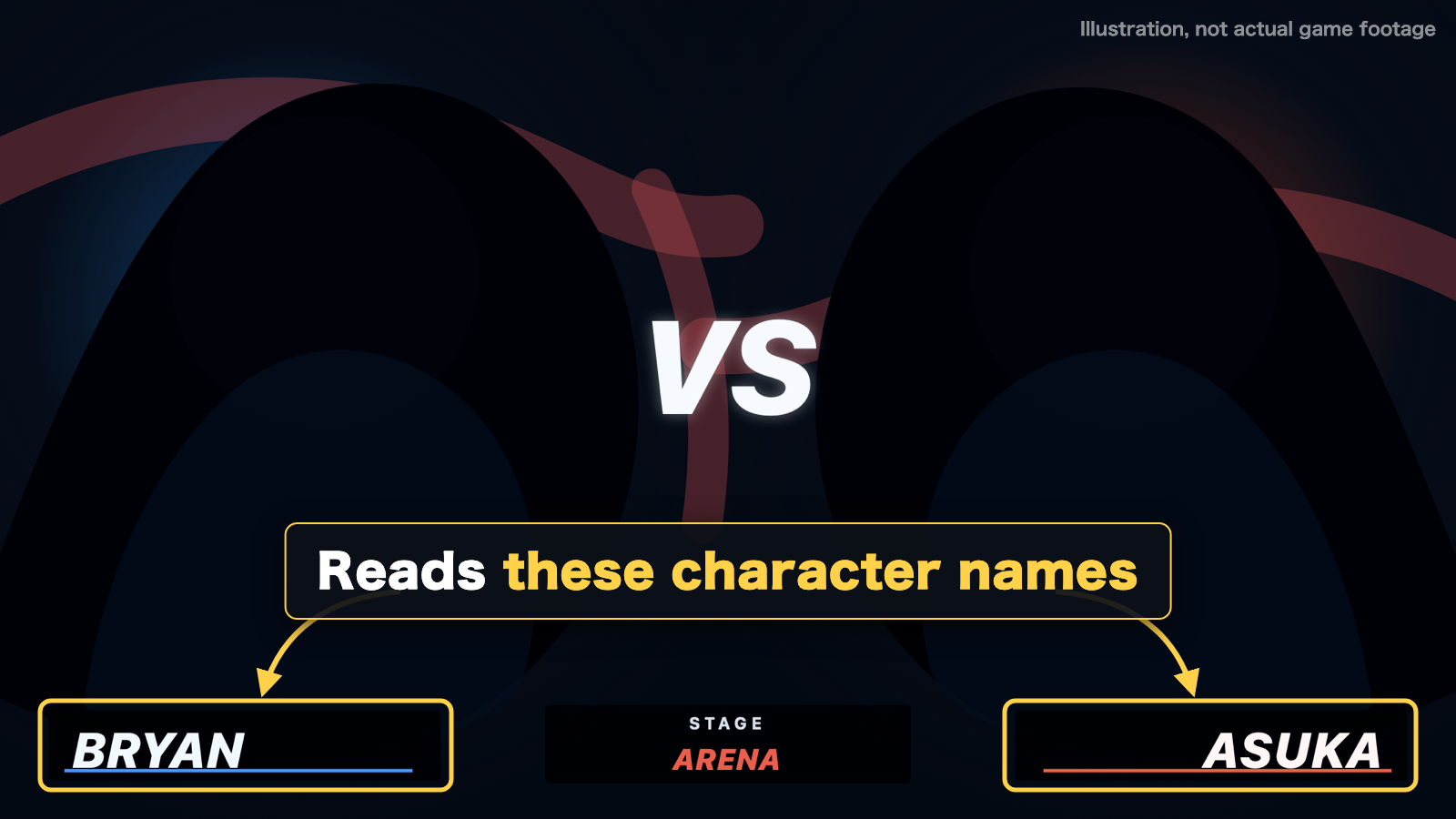
If it still can't read the screen, press Ctrl+K to pick the opponent right away.
Auto Match Scan is ON, but my opponent's character never changes
First, check "Auto-scan online matches only" in Settings. It is ON by default, so KOBUSHI only reacts to VS screens that show ranks (Ranked, Quick and Player matches). In Practice or Arcade Quest it keeps saying "Scanning" and never switches. Turn it OFF if you want offline matches picked up too.
If you play on a console, check that the window selected in Settings → Match Scan is really the one showing your game video. "Check current video" on the same screen shows you exactly what KOBUSHI is looking at right now.
If both look right, a setting may not have been applied — please restart the app. When "Show the window when TEKKEN 8 starts" is ON, the × button only hides the window and KOBUSHI stays in the system tray. Right-click the tray icon → Quit, then start it again.
Windows shows "Windows protected your PC" when I run the installer
This SmartScreen warning appears because the app is not code-signed (no publisher certificate) — this is common for free, individually developed tools. Click "More info" and then "Run anyway" to start the installer. The warning reflects the absence of a certificate, not an inspection of the app's contents. The Microsoft Store version installs without this warning.